
In industrial applications, most of the automation is based on PLCs. PLCs are specialized computers that read data from sensors and transmit data to actuators to automate and control processes.
A common communication protocol in the industry to exchange data between PLC, sensors, and actuators is EtherCAT. This protocol, which was originally developed by Beckhoff, provides an easy way to achieve real-time control at very high update rates.
Below, you can read more about how to use EtherCAT devices with Beckhoff PLCs and how to connect devices to it, e.g. Bota Systems force torque sensors.
What is a PLC?
Programmable Logic Controllers, commonly known as PLCs, are industrial ruggedized computers designed to operate in harsh industrial environments.
They are widely used in manufacturing processes, assembly lines, and the control of robotic devices. They are modular devices that can be easily programmed and configured to perform various tasks in different industrial settings and are capable of hard real-time control.
Although they used to be able to only perform simple series of logical expressions they are now capable of running complex programs. There are many PLC manufacturers, including Siemens, ABB, Beckhoff, Allen Brandley, etc.
Each manufacturer has its own range of products with different capabilities and features (computation power, connectivity, power consumption, etc).
What is TwinCAT?
TwinCAT, which stands for “The Windows Control and Automation Technology” is a software developed by Beckhoff.
It is primarily used for programming and configuring Beckhoff PLCs, which are widely used in industrial automation systems.
The software is divided into engineering and runtime for development and execution. There are existing software modules (functions) to flexibly extend the basic functionality for specific applications.
A big advantage of TwinCAT is that it can turn a standard Windows-based PC into a real-time capable controller, making it a good choice for the development of PLC applications.
What is EtherCAT?
Ethernet for Control Automation Technology or EtherCAT is an Ethernet-based fieldbus system that can be used for real-time communication and control.
It was invented by Beckhoff Automation but is an open standard, which means that it is not tied to any specific hardware or software vendor. This makes it a more cost-effective solution than proprietary systems, which may require expensive hardware and software components.
It is capable of real-time control with update rates up to 10 kHz. Additionally, multiple devices can be connected to one another as a daisy chain. The main drawback of designing EtherCAT devices is that they still need specific hardware to implement the communication.
EtherCAT is based on a Master-Slave model for communication. The EtherCAT master runs on the PLC and is the only one allowed to transmit data across the network.
The EtherCAT slaves are all the connected devices such as sensors, actuators, etc., and are controlled by the EtherCAT master.
How to use EtherCAT devices in TwinCAT 3?
The physical EtherCAT connection is based on Ethernet, and therefore EtherCAT devices can be connected directly to a PLC or PC through such a cable.
When connecting a device to a PC it is important to check whether TwinCAT supports the corresponding network adapter, as this is not always the case. For most devices, a PoE injector needs to be connected between the device and the PLC to provide the necessary power.
Apart from daisy-chaining multiple EtherCAT devices. EtherCAT junction boxes also exist giving the possibility to create more complex topologies.
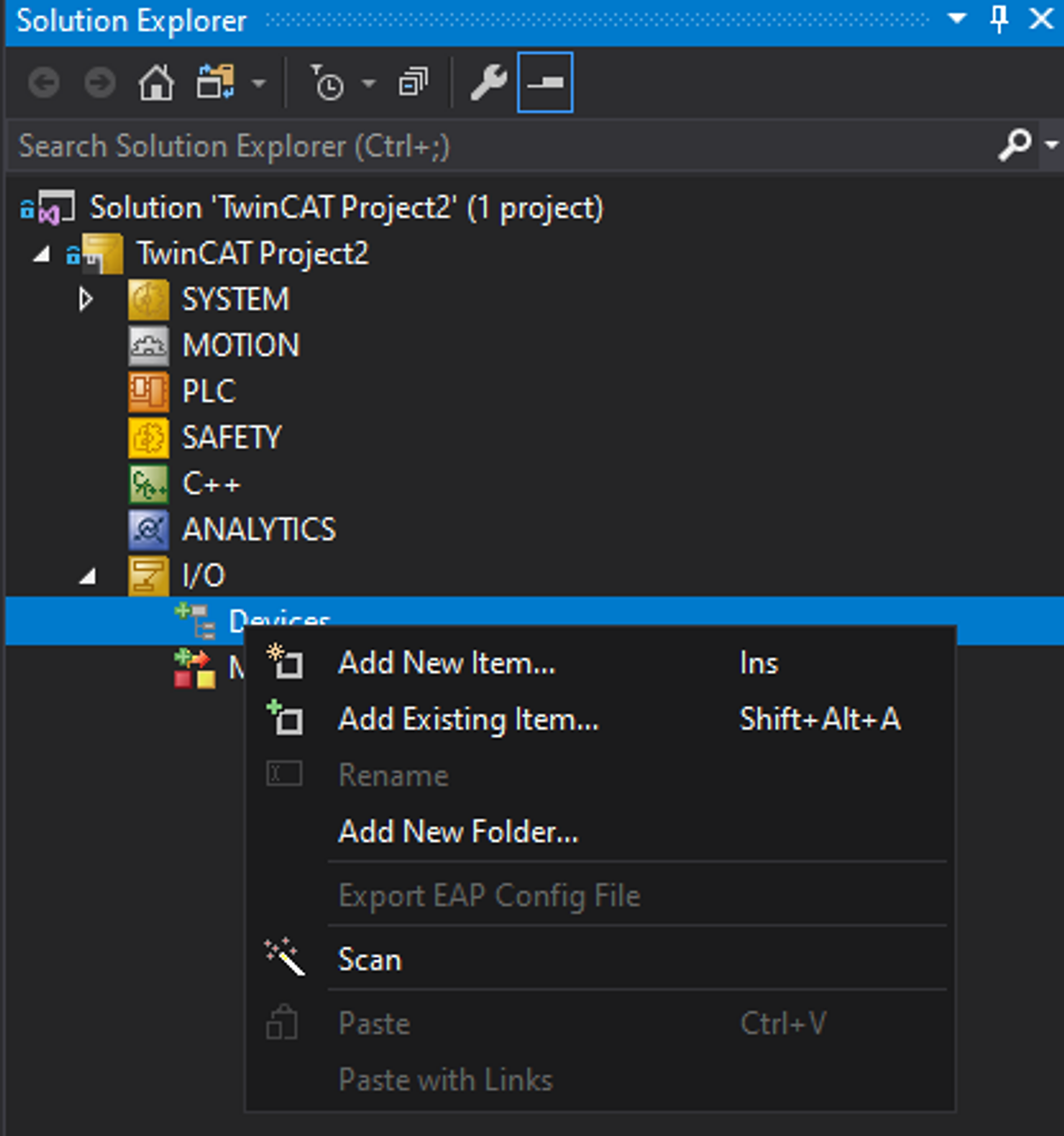
The easiest way to configure the EtherCAT master and to add a device is to select the “Scan” option in the right-click menu of the I/O > Devices. This will automatically configure a master, scan the compatible ports for EtherCAT devices (boxes), and add them to the system.
Alternatively, the EtherCAT master and the device can be added manually by selecting the “Add Existing Item” option in the right-click menu of the I/O and adding the corresponding device.
After a device is added, its input and outputs need to be linked to the corresponding variables in the program. This essentially maps the inputs and outputs of the connected device to variables in the program so that data can be exchanged between the program and sensors or actuators.
For example read out measurements from a sensor or send commands to an actuator. Additional information about configuring devices can be found here.
How to use a serial device in TwinCAT 3?
It is also possible to use devices with serial communication with TwinCAT. Serial communication can be achieved through the following hardware:
Virtual COM ports
Physical COM ports
Beckhoff KL and EL modules
For the Virtual COM port, no device needs to be added to the system. Virtual COM ports can be directly accessed from TwinCAT with the function “SerialLineControlADS” and data can be read and transmitted into the corresponding buffers.
For Physical COM ports and KL end EL modules, the correct devices will need to be added to the system similar to an EtherCAT device. Receiving and transmitting data from the device can be done similarly to the Virtual COM port with the function “SerialLineControl”.
As an example, connecting a Bota Systems serial force torque sensor and parsing the data frame correctly can be found here.
Although, it is possible to use serial devices with TwinCAT, whenever there are EtherCAT devices available they should be preferred. This is because the performance of serial communication is generally inferior to EtherCAT.
This results in significantly lower update rates due to the limitation of the baud rate at 115’200 bauds as well as higher latency.
If you have any questions about how to integrate a sensor in an EtherCAT fieldbus, we recommend talking with one of our experienced engineers to discover the best solution.